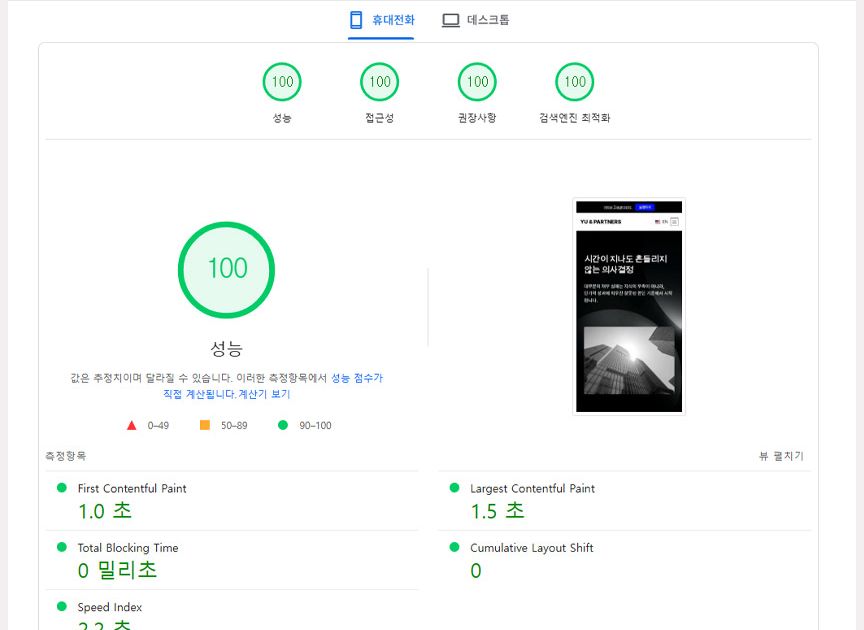
Core Web Vitals are three metrics — Largest Contentful Paint (LCP), Interaction to Next Paint (INP), and Cumulative Layout Shift (CLS) — that Google uses to measure real user experience, and they have been part of the page experience ranking signal since 2021. The practical targets are LCP under 2.5 seconds, INP under 200 milliseconds, and CLS under 0.1, measured at the 75th percentile of real user sessions.
The important detail is that last part: Google evaluates field data from real visitors, not a single lab run.
A page that scores 100 in a synthetic test can still fail in Search Console if slower devices and networks pull the 75th percentile above the threshold.
This guide covers what each metric measures, how to read the thresholds, and which fixes actually move the number.
The Three Metrics and Their Thresholds
LCP — Largest Contentful Paint (loading speed)
LCP measures how long it takes for the largest content element in the viewport — usually a hero image or a heading block — to render.
| Rating | Threshold | Meaning |
|---|---|---|
| Good | Under 2.5s | Acceptable |
| Needs improvement | 2.5s – 4.0s | Fix required |
| Poor | Over 4.0s | Urgent |
INP — Interaction to Next Paint (responsiveness)
INP measures the delay between a user interaction — click, tap, or key press — and the next visual update.
It replaced First Input Delay (FID) as a Core Web Vital, because FID only measured the input delay and ignored how long the page then took to respond.
| Rating | Threshold | Meaning |
|---|---|---|
| Good | Under 200ms | Acceptable |
| Needs improvement | 200ms – 500ms | Fix required |
| Poor | Over 500ms | Urgent |
CLS — Cumulative Layout Shift (visual stability)
CLS measures unexpected layout movement during loading — content that jumps because an image, ad, or font resolved late.
| Rating | Score | Meaning |
|---|---|---|
| Good | Under 0.1 | Acceptable |
| Needs improvement | 0.1 – 0.25 | Fix required |
| Poor | Over 0.25 | Urgent |
How to Measure
| Tool | Data source | Best for |
|---|---|---|
| PageSpeed Insights | CrUX field data + lab data | Overall assessment of a live URL |
| Chrome DevTools | Live profiling | Debugging during development |
| WebPageTest | Configurable network and device | Detailed, repeatable testing |
| Search Console | Site-wide field data | Long-term monitoring across many pages |
Use field data to decide whether there is a problem, and lab data to find where it is. The two disagree often, and the field data is the one that counts.
Optimization Playbook
Improving LCP
- Serve correctly sized images. The most common cause of a slow LCP is a hero image far larger than its rendered box. Serve modern formats (WebP or AVIF) at the dimensions actually displayed.
- Prioritize the LCP element. Preload the hero image or font, and avoid lazy-loading anything above the fold.
- Inline critical CSS. Removing the render-blocking stylesheet request shortens the path to first paint.
- Reduce server response time. Keep TTFB low with caching and a CDN; a slow origin delays everything after it.
- Choose a rendering strategy deliberately. Server-rendered or statically generated HTML reaches the browser faster than a client-rendered shell that must fetch data before painting.
Improving INP
- Break up long tasks. Any single JavaScript task over 50ms blocks the main thread and delays the next paint.
- Defer non-essential scripts. Analytics, chat widgets, and marketing tags should not compete with interaction handling.
- Debounce and throttle. Input handlers that fire on every keystroke or scroll event should be rate-limited.
- Move heavy work off the main thread. Web Workers keep expensive computation from blocking rendering.
Improving CLS
- Always declare image and video dimensions. Set
widthandheight, or reserve space withaspect-ratio. - Reserve space for dynamic content. Ads, embeds, and injected banners should have a fixed slot before they load.
- Stabilize web fonts. Use
font-display: swapwith a metric-compatible fallback so text does not reflow when the custom font arrives. - Avoid inserting content above existing content. Anything that pushes the page down after load counts as a shift.
Why It Matters Beyond Rankings
Performance is a ranking input, but the business case is broader:
- Faster pages convert better. The relationship between load time and conversion rate is well documented across retail and lead-generation sites.
- Slow mobile pages lose visitors before they see anything. Abandonment rises sharply once load time passes a few seconds.
- Good Core Web Vitals correlate with lower bounce rates and longer sessions, which feed back into engagement signals.
Treat performance as a product requirement rather than a one-time audit. Metrics regress quietly as images, scripts, and third-party tags accumulate.
Frequently Asked Questions
Is Core Web Vitals a ranking factor?
Yes. Google has confirmed page experience — including Core Web Vitals — as part of its ranking systems. It is one signal among many, and strong content still outweighs a fast but thin page.
Why does PageSpeed Insights show a different score than Search Console?
PageSpeed Insights reports both lab data (a single simulated run) and field data (aggregated real-user data). Search Console reports field data only. When they disagree, the field data reflects what users actually experience.
How often should Core Web Vitals be checked?
Monitor continuously through Search Console, and re-test after any significant change: a new template, a new third-party script, a CMS upgrade, or a hosting migration.
Can a JavaScript-heavy site pass Core Web Vitals?
Yes, but it requires deliberate work: server-rendering the initial HTML, splitting bundles, deferring non-critical scripts, and keeping the main thread free during interaction.
Where to Start
If you are planning a build or a redesign, performance is cheapest to get right at the architecture stage — rendering strategy, image pipeline, font loading, and script budget. Retrofitting those later usually means rebuilding templates.
SowonWeb builds sites with Core Web Vitals targets set before development begins. Explore our SEO service, review pricing, or get in touch to discuss your project.